pixie.haus

Select a palette below to preview it.

manage my palettes →
Loading... Selected Image

When generation is completed you will receive a notification and it will be saved. It usually takes up to 3 min. Meanwhile, you can generate some still pictures or check the gallery.

AI Pixel Art Generator

True pixel-grid AI pixel art: sprites, sprite sheets and animations for your game. No blurry upscaling.

Questions

Is pixie.haus free?

You get 50 free credits when you sign up, with no card needed. The fastest image models cost 1 to 3 credits per image, so you can try several models before you decide. After that you top up with credit packs.

How is this different from ChatGPT or other AI image generators?

General image models draw "pixel-style" pictures at high resolution: the pixels are blurry, uneven and inconsistent in size. pixie.haus snaps every result to a true pixel grid at its native size, so one pixel really is one pixel, with clean edges and an optional fixed palette. The result can go straight into a game engine.

What sizes and formats can I export?

Pick 32x32, 64x64 or 128x128, or Auto, which detects the image's native pixel grid and keeps it. Images download as PNG, WebP or JPG, with a transparent background if you want one. Animations download as GIF, WebP or MP4, or as a sprite sheet.

Can it animate sprites?

Yes. Start from a still sprite, describe the motion (walking, idle breathing, an attack), and pixie.haus turns it into a looping pixel art animation that you can export as a GIF or a sprite sheet. See AI pixel art animation for the models, formats and examples.

Can I convert an image to pixel art?

Yes. Upload a sketch, a 3D render or a photo as a reference, and it is redrawn as pixel art on the grid, at the size and palette you choose.
Picture Mode

Generate Pixel-Perfect Art

Type a prompt and let the AI pixel art generator create clean, game-ready assets. Instead of blurry AI upscaling, we force the output into a strict grid for authentic ai generated pixel art.

  • True 1:1 grid snapping for a pixel-perfect look.
  • Locks into classic color palettes (Lospec compatible).
  • Automatic background removal for instant use.
Animation Mode

Pixel Art Animation AI

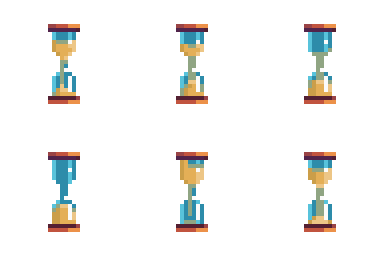
Turn static characters into moving sprites. Our pixel art animation ai figures out the movement for you, turning a single image into fluid walking, breathing, or attack loops.

  • Generate idle, walk, and attack cycles instantly.
  • Edit individual frames directly in the timeline.
  • Download as a GIF or export ready-to-use spritesheets.
Edit with AI

Edit & Iterate with AI

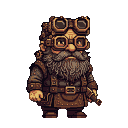
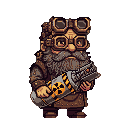
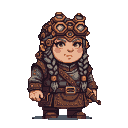
Make changes without ruining your original sprite. Use image to image ai to swap outfits, change hairstyles, or adjust lighting while keeping the underlying pixel structure perfectly intact.

  • Target specific areas to generate quick variations.
  • Keep your art style consistent across edits.
  • Clean up stray pixels and messy outlines automatically.
Original pixel art sprite - A grizzled dwarf with steampunk goggles and a bushy beard. > AI pixel art edit - Stout, grizzled dwarf with goggles and thick beard holds a cylindrical object with a biohazard symbol and yellow and black warning stripes. > Final pixel art AI asset - Steampunk female dwarf with braided grey hair, goggles, leather and metal outfit, bandolier, and belt with buckle.
Upload Image

Upload Images as a Reference

Don't want to start from scratch? Upload your sketches, 3D renders, or photos. Our image to pixel art ai correctly downsamples them into clean sprites that snap to the grid and match your color palette.

  • Convert high-res images into strict pixel art.
  • Create NPC variations from a single uploaded drawing.
  • Send your uploaded art directly into the animation engine.
×

Created

0

Likes

0

Collected

0

Earned

0

Notification

Are you sure?